
Quick Summary
This electric gate troubleshooting guide explains how to identify and resolve common operating failures caused by power interruptions, sensor misalignments, and mechanical binding. While simple fixes like clearing obstructed photo-eyes or resetting breakers can restore movement quickly, Ironworks Gate Co. offers expert same-day diagnostics for complex control board, capacitor, and structural alignment issues. After reading, property owners will understand how to systematically diagnose opener faults, perform safe manual releases, and identify when professional repair is necessary.
Electric Gate Troubleshooting: Fix Common Failures Fast
This practical guide to electric gate troubleshooting walks you through isolating common gate failures, from simple photo-eye misalignments and tripped breakers to mechanical binding and control board faults. Addressing basic power or sensor issues early can restore access quickly and help you determine when a repair requires professional service.
Always keep people, pets, and vehicles clear of the gate path during testing, and never bypass safety sensors or entrapment-protection systems. While clearing dirt off optical lenses or resetting a breaker takes only a minute, working around high-voltage control boards, stored capacitor charges, or heavy mechanical assemblies carries real risks. Automated vehicular gate standards exist specifically because moving gates exert significant mechanical force.
Ironworks Gate Co. provides specialized diagnostic, maintenance, and repair services for custom residential and estate gates throughout coastal and canyon properties. Work through the diagnostic checks below to identify what is stopping your system, or call an experienced gate technician for on-site troubleshooting.[1]
Why Is My Electric Gate Not Opening or Closing?
Quick Answer: An electric gate typically stops operating because of a tripped breaker, blocked or misaligned safety photo-eyes, physical drag from hinge wear or track debris, a dead start capacitor, or an active safety limit. Identifying whether the motor is receiving power and humming versus remaining completely silent points directly to the underlying problem.[3]
When an automatic gate will not open or close, the issue generally falls into one of three categories: electrical power delivery, safety interlock activation, or mechanical resistance. Gate operators are designed to stop running whenever internal safety logic registers an active sensor trigger or excessive resistance along the gate line.[4]
Immediate Power and Safety Interlock Checks
Modern electric driveway gate troubleshooting starts with the basic supply and safety circuits. Automated operators rely on monitored entrapment-protection systems to function safely. If an infrared safety beam is blocked, dirty, or knocked out of alignment, the controller will automatically refuse to close the gate to prevent property damage or injury.
Systematic Diagnostic Sequence
Work through these basic checks before opening any operator housing:
- Verify the circuit: Check the dedicated subpanel breaker, inspect the outdoor disconnect switch, and test any external GFCI outlets tied to the operator feed.
- Inspect manual release interlocks: Confirm that the mechanical emergency release lever, keyed disconnect, or hydraulic bypass valve is locked firmly into automated drive mode.
- Listen for operator audio cues: Send a cycle command via remote or keypad. Listen closely to see if the motor stays dead silent, clicks an internal relay, or produces a sustained low humming sound.
| Observed Symptom | Probable Root Cause | Recommended First Action |
|---|---|---|
| Silent motor; no relay clicks or board LEDs | Tripped breaker, blown transformer fuse, or dead main supply | Check subpanel breaker, GFCI reset, and primary power disconnect. |
| Humming motor; no arm or chain movement | Blown start capacitor, seized gearbox, or severe mechanical binding | Shut off power immediately to protect motor windings; test manual gate swing. |
| Gate opens fully but refuses to close | Blocked photo-eye, misaligned sensor, or failed safety edge circuit | Clean sensor lenses and check transmitter/receiver indicator lights. |
| Gate starts moving, then stops halfway and reverses | Excessive mechanical drag, sagging hinges, or tight force limits | Inspect hinges, rollers, and ground track for physical friction or settling. |
In coastal and hillside environments, physical resistance from salt corrosion or post movement frequently creates mechanical drag that control boards interpret as an obstruction, shutting down the cycle prematurely.
Check Mechanical Drag and Soil Creep Before Electrical Components
Need electric gate troubleshooting?
We’re available now - call for a fast, free estimate.
Before assuming an electronic fault when an automatic gate won’t open, inspect the structural foundation and moving hardware. Heavy ornamental iron and wood-clad steel gates require precise alignment. When support posts shift out of plumb or hinges bind, the operator encounters high physical resistance. Modern logic boards monitor motor current; when amperage spikes due to friction, the board triggers an automatic safety reversal that mimics an electrical failure.
- Disengage the motor: Turn off main power at the breaker and release the operator clutch or swing arm using the manual disconnect key.
- Test manual swing or roll: Walk the gate through its complete travel path by hand. The movement should feel continuous and smooth with minimal effort. Any sticking points, scraping sounds, or resistance indicate mechanical binding.
- Check post plumb with a level: Place a long spirit level against both hinge and latch posts. Check both the face and side profile to ensure hillside settling has not pushed the posts out of true vertical alignment.
How Hillside Soil Movement Causes False Amperage Overloads
Properties built on canyon slopes and hillside terrain experience gradual soil creep. Over time, ground movement places pressure on subterranean footings, causing heavy gate posts to lean even slightly. A post that is off-plumb by just one or two degrees places significant angular torque on heavy-duty ball-bearing hinges.
This added friction increases the mechanical workload on the motor. During cold mornings or windy conditions, the extra drag pushes the motor past its inherent force limits, prompting the control board to halt operation and log a false obstruction fault code.
Coastal Salt Air Corrosion on Hinges, Rollers, and Tracks
Marine environments deliver constant airborne salt spray that penetrates unsealed roller bearings, ground tracks, and swing arm pivot joints. Salt crystallization and surface oxidation create friction along the drive track or inside hinge pins.
- Clean ground tracks on sliding gates regularly to clear sand, decomposed granite, and salt crusts.
- Inspect cantilever rollers and sealed bearing hinges for rust staining or gritty rotation.
- Apply marine-grade, non-attracting synthetic lubricants to grease fittings and pivot points rather than thin penetrating oils that wash away quickly.
How to Inspect, Clean, and Realign Gate Safety Sensors
Safety photo-eyes and optical sensors prevent automatic gates from closing on vehicles, pedestrians, or obstacles. When a gate opens but refuses to close, safety sensor circuits are almost always the reason. Keeping these components clean and aligned is an essential maintenance task.
Diagnosing Photo-Eye LED Status Indicators
- Clean the optical lenses: Wipe both sensor faces using a soft microfiber cloth. Coastal moisture causes ocean fog, dust, and spider webs to stick to lenses, scattering the infrared light beam.
- Examine the LED status lights: Look at the diagnostic LEDs on both the transmitting and receiving sensor units. A solid green or red light (depending on the brand) confirms healthy power and optical alignment. A flashing, dim, or dark light indicates misalignment, internal condensation, or broken low-voltage wiring.
- Check physical bracket alignment: Ground vibrations from traffic or accidental bumps from lawn equipment can knock sensor brackets out of horizontal line. Loosen the mounting hardware slightly, align the lenses directly across the opening, and re-tighten securely.
- Inspect wiring and junction seals: Check the low-voltage wiring running from the sensor back to the main control box. Look for cracked conduit, rodent chewing, or water intrusion inside weather seals.
Safety Standards and Entrapment Protection
Under safety standards developed jointly by the Consumer Product Safety Commission (CPSC) and Underwriters Laboratories (UL 325), automatic gate operators require at least two independent mechanisms to prevent entrapment. The two principal protection methods described by the Consumer Product Safety Commission are an inherent device that reverses the gate when it contacts an obstruction, combined with a secondary device such as an electric eye or edge sensor.[2]
Similarly, the Health and Safety Executive provides clear guidance highlighting that powered gates have been involved in serious and fatal incidents, emphasizing strict adherence to regular safety checks, legal responsibilities, and safe operation. ASTM F2200 addresses automated vehicular gates, including horizontal sliding, horizontal swinging, vertical lift, vertical pivot, overhead pivot, and horizontal bifold gates. It includes specific provisions for fall-over protection, hazardous protrusions, and positive stops to prevent catastrophic gate derailment.[5]
Troubleshooting Operator Power Failures, Capacitors, and Control Boards
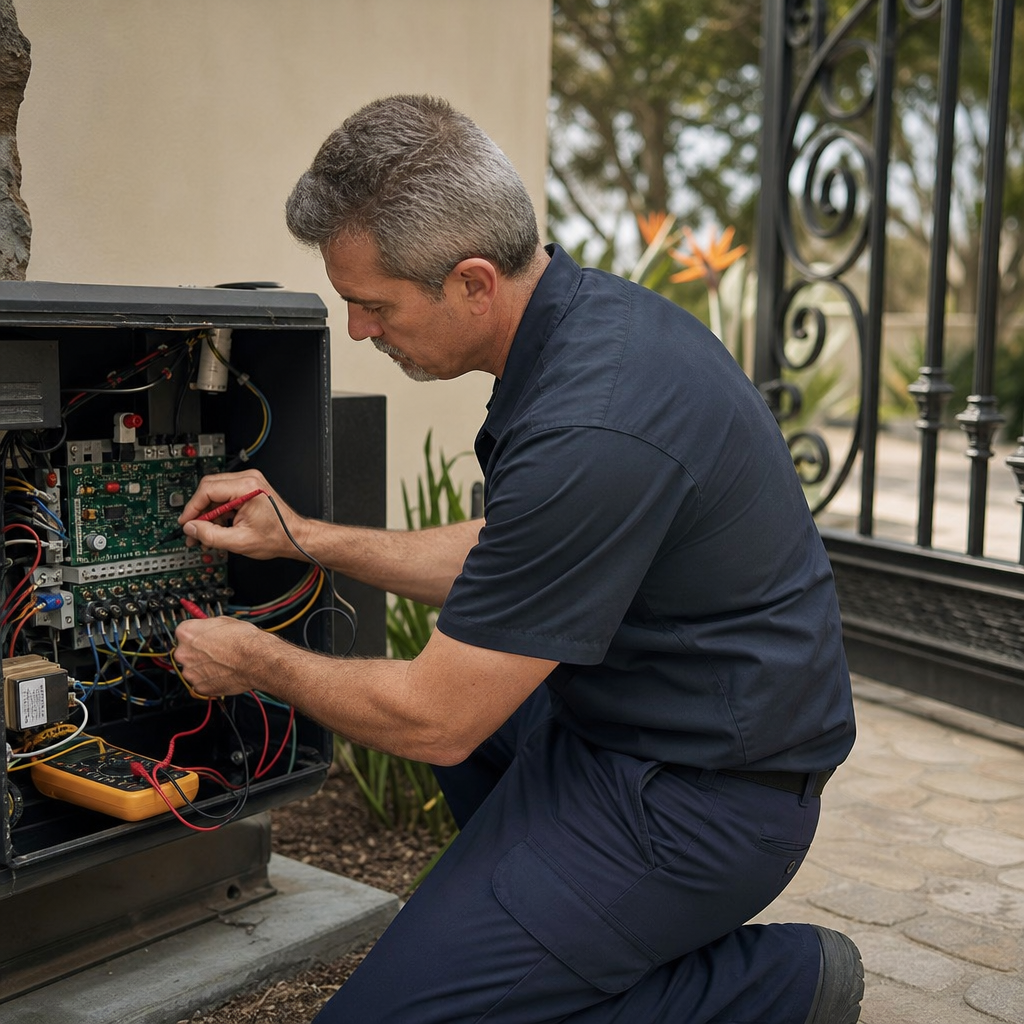
If an automatic gate moves freely by hand but shows no motor response, the breakdown lies within the power supply, starting components, or electronic controller.
Capacitor and High-Voltage Safety Warning
Warning: High-voltage control boxes and internal start capacitors store dangerous electrical charges even when main breakers are turned off. Do not touch internal capacitor terminals or high-voltage wiring blocks. If testing requires meter diagnostics across live circuits, bring in a licensed gate automation specialist such as Ironworks Gate Co.
Testing for a Blown Motor Start Capacitor
Single-phase AC gate motors rely on a cylindrical start/run capacitor to provide the phase shift required to turn the motor rotor under heavy mechanical load. Capacitors wear down over years of heat cycles and continuous operation.
- Typical symptom: The control board relays click, and the motor produces a steady, audible hum for a few seconds before the thermal overload trips, but the drive arm or chain never turns.
- Visual check: A failing capacitor may show bulging at the top seal, oil leakage, or scorch marks around its connection terminals.
- Resolution: A technician can safely discharge the component and test its microfarad (uF) rating using a digital multimeter, replacing it with an exact factory-matched rating.
Resetting the Logic Board After Outages and Surges
Lightning strikes, grid fluctuations, and utility power surges can lock modern electronic control boards into an unyielding error state. A clean system reset often clears temporary logic memory:
- Isolate all power: Turn off the dedicated gate circuit breaker in your electrical subpanel. Disconnect any 12V or 24V emergency backup batteries inside the operator enclosure.
- Wait for discharge: Leave the system unpowered for a full 5 to 10 minutes to allow all board capacitors and microprocessor memory to discharge completely.
- Inspect internal components: Check the control box for signs of insect nesting, gecko intrusion, corrosion around terminal strips, or moisture condensation.
- Restore main power: Reconnect the battery leads, turn on the primary breaker, and run a full cycle using a hardwired push button or transmitter to observe how the board initializes travel limits.
Why Driveway Gates Stop Halfway, Reverse, or Open by Themselves
Need electric gate troubleshooting?
We’re available now - call for a fast, free estimate.
Unintended movement or mid-travel stopping indicates either incorrect force/limit calibration or phantom inputs from external access hardware.
Adjusting Motor Travel Limits and Inherent Force Sensitivity
Gate operators track open and close positions through mechanical limit switches, magnetic sensors, or rotary pulse encoders. Over time, heavy gate momentum, vibration, and hinge wear cause these trigger points to drift.
- Check physical limit cams: Ensure limit cams, strike plates, and magnetic pickups on swing arms or slide chains are firmly tightened and engage the microswitches cleanly.
- Evaluate inherent force settings: Modern operators feature force adjustment potentiometers or digital menu settings. If the force sensitivity is set too low, moderate wind gusts or mild hinge resistance will trigger an immediate emergency reversal. Adjust force thresholds strictly within manufacturer-rated limits to preserve entrapment protection.
- Check positive travel stops: ASTM F2200 standards require positive mechanical stops to prevent a gate from over-traveling its track. Confirm that travel limits shut off motor power just before the gate makes contact with structural stop posts.
Eliminating Radio Interference and Phantom Triggers
If your driveway gate opens unexpectedly on its own, the cause is usually an accessory short or external radio signal rather than a faulty motor:
- Moisture in access keypads and intercoms: Marine fog and rainwater can short contact terminals inside outdoor keypads, hardwired exit buttons, or intercom stations, sending a continuous open command to the board.
- Inground safety and exit loop faults: Inground inductive loops buried in the asphalt or pavers can degrade over time. Shifting concrete or water ingress into the loop wire insulation changes loop inductance, triggering false vehicle presence signals.
- Radio frequency cross-talk: Older 300-390 MHz fixed-code remotes can receive stray signals from nearby neighborhood openers. Upgrading to modern rolling-code radio receivers eliminates signal crossover.
Gate Opener Repair vs. Replacement: Evaluating Motor Life and Wear
Determining whether to repair a faulty operator or replace the unit depends on the age of the machine, structural condition, and current safety standards.
| Factor | Repair Is Recommended | Replacement Is Recommended |
|---|---|---|
| Unit Age | Under 7-10 years old with parts readily available from major manufacturers. | Over 15-20 years old, running obsolete circuit designs with discontinued parts. |
| Motor & Gearbox | Motor windings test healthy; gearbox is sealed with no internal gear play. | Internal gear teeth are stripped, shaft bearings are seized, or motor windings are burnt. |
| Safety Features | Unit supports monitored external entrapment sensors (UL 325 compliant). | Legacy operator lacks inputs for monitored photo-eyes or contact edges. |
| Corrosion Level | Surface rust confined to exterior covers; electronics enclosure is clean and dry. | Heavy internal chassis rot, corroded wiring harnesses, and salt-damaged circuit boards. |
Frequently Asked Questions About Electric Gate Troubleshooting
How do I manually open an electric gate during a power outage?
Locate the mechanical release mechanism on your operator. On swing gates, this typically requires inserting a release key into the operator arm housing and turning it 90 degrees, or removing a retaining pin from the gate bracket. On slide gates, open the motor chassis and turn the manual clutch release knob or flip the drive disconnect lever. Always make sure power is turned off before releasing the gate manually, and securely lock the clutch back in place before restoring power.
Why does my electric gate open normally but refuse to close?
A gate that opens fully but will not close is almost always responding to an active safety sensor interlock. Inspect your safety photo-eyes along the driveway threshold. Clean dirt and spider webs off the lenses, check that both sensor LEDs show a solid alignment signal, and confirm that no low branches, leaves, or parked items are breaking the infrared beam.
What does it mean when the gate motor hums but does not move?
A motor that hums under power without turning indicates that either the electrical start capacitor has failed or the mechanical drive train is physically jammed. Turn off the circuit breaker immediately to prevent the motor windings from overheating or burning out, then test the gate by hand to check for mechanical binding along the track or hinges.
How do I reset an automatic gate opener after a power outage?
Turn off the dedicated circuit breaker, disconnect any internal battery backup terminals inside the control enclosure, and wait approximately 5 to 10 minutes. Reconnect the battery leads and turn the main breaker back on. Send a command using a hardwired button or remote transmitter; the operator will typically run a slow calibration cycle to find its open and close limit stops.
When basic visual checks, cleaning, and breaker resets do not solve your gate failure, call a dedicated gate technician from Ironworks Gate Co. to inspect the foundation, mechanical hinges, and electronic components safely.
Need electric gate troubleshooting?
We’re available now - call for a fast, free estimate.
Sources
- [PDF] 2024-11-20-COPF-CODD-Hummingbird-Alliance-Meeting-Log.pdf – cpsc.gov (2024)
- AB 2149 (Connolly) – sjud.senate.ca.gov (2024)
- New Safety Standard for Automatic Security Gates Helps Prevent … – cpsc.gov (2000)
- [PDF] Investigation Guideline Product: Automatic Gate Operators Appendix – reginfo.gov
- Risks to pedestrians from crushing zones on electrically powered gates – hse.gov.uk (2008)
Related reading: Sliding Gate Roller Replacement | Call Now-10% Off | Same-Day Service | Free Estimate
Related reading: Reset Gate Motor | 10% Off & Free Estimate | Same-Day Service
Related reading: Open Electric Gate Manually – 10% Off & Free Estimate – Same-Day Service
Frequently Asked Questions
How can I safely test if my electric gate's auto-reverse safety system is functioning properly?
Place a rigid, non-damaging object in the closing gate's travel path and initiate a cycle from a safe distance. The gate should immediately stop and reverse upon meeting light resistance or when breaking the optical safety beam. If the gate continues pushing or fails to reverse, reach out to Ironworks Gate Co. for immediate force-limit recalibration and safety compliance testing.
Why does my electric gate trigger false obstruction stops on cold mornings or in damp weather?
Cold weather thickens bearing lubricants while coastal moisture and fog scatter optical sensor beams, causing intermittent signal loss. These environmental factors create subtle friction and resistance that push motor amperage beyond calibrated force thresholds. Applying marine-grade synthetic lubricant and keeping photo-eye lenses clean will typically prevent false obstruction triggers.
What should I do if the gate control board still shows fault codes after a complete power reset?
Persistent error codes after a full power cycle typically point to blown onboard fuses, shorted accessory wiring, or voltage-surge damage to microprocessor circuits. Because control enclosures house dangerous high-voltage lines and stored capacitor charges, avoid probing live terminals yourself. Contact Ironworks Gate Co. to schedule a professional diagnostic inspection and control board repair.
About the author
 |
Sarah Miller Sarah Miller is a specialized content writer focusing on property security and access control systems, with over six years of experience in the home services industry. Holding a B.A. in Communications from California State University, Fullerton, she translates complex technical repair processes and pricing structures into clear, actionable advice. Her work helps property owners navigate gate maintenance and repair costs, ensuring they make informed decisions when hiring contractors. |
Gate not opening, off track, or opener dead?
We’re available now - call for a fast, free estimate.
Call Now - Free Estimate